Electric Height-Adjustable Standing Desk Setup & Buying Tips
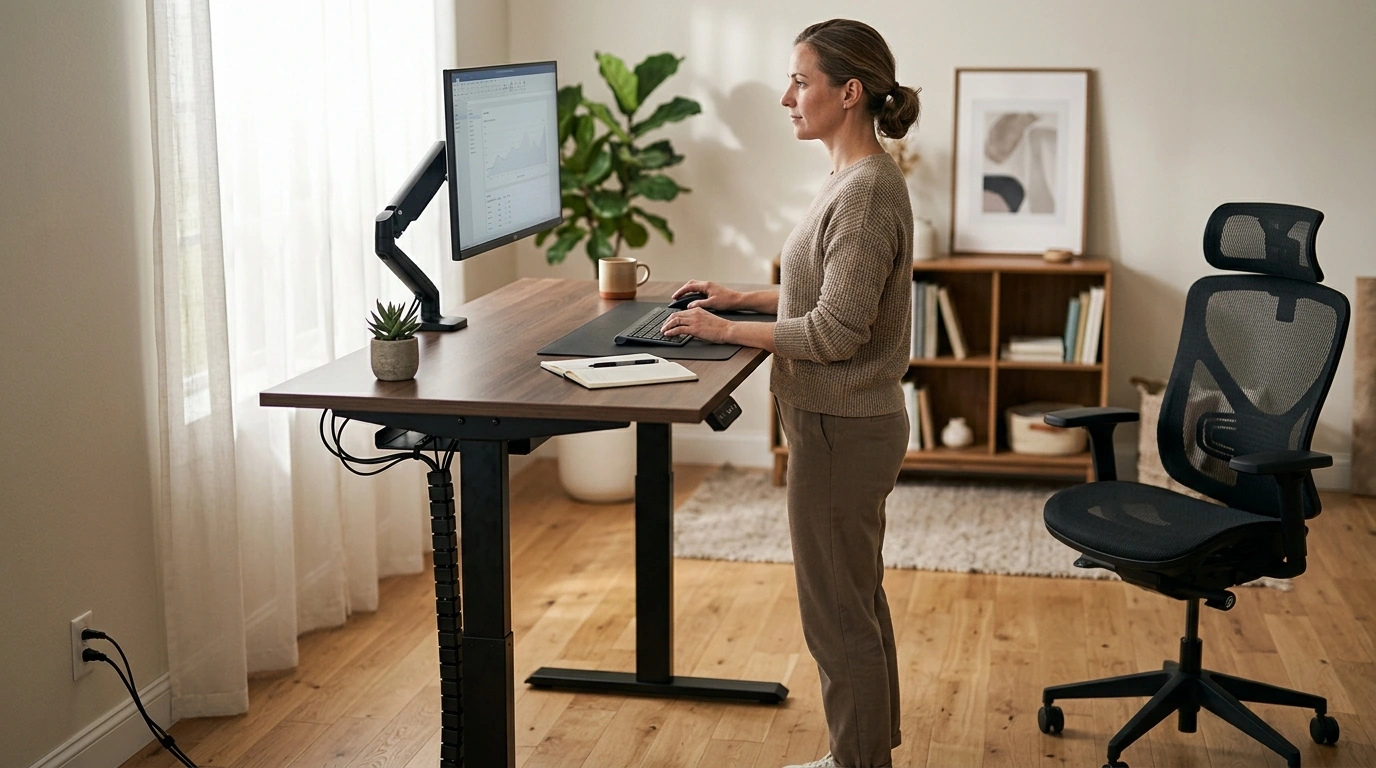
Electric Height-Adjustable Standing Desk: A Flexible Work Surface for Home or Office
An electric height-adjustable standing desk helps shift between sitting and standing throughout the day, supporting better posture variety and a more adaptable workspace. Key differences come down to lift range, stability at full height, desktop size, control options, and how easily it fits into a daily routine.
What an electric height-adjustable desk changes in day-to-day work
One of the biggest benefits of an electric sit-stand desk is how quickly it breaks up long, uninterrupted sitting time. Switching positions doesn’t need to be dramatic—just moving between seated and standing modes a few times a day can make long sessions feel less “locked in” and more comfortable.
Height adjustment also makes the workstation easier to fit to real life. Different body sizes, chair heights, and even footwear can change where your elbows land. That matters in shared rooms (home offices, studios, classrooms) where one desk might serve more than one person.
Many people find standing works best for shorter tasks—calls, reviewing notes, quick edits—while seated mode is better for longer typing or precision work like spreadsheets or design. The goal isn’t to stand all day; it’s to create more options.
Small habit shifts tend to stick. Alternating on a simple schedule—such as standing for a short block each hour—often feels more sustainable than trying to force a full-day standing routine.
Quick specs to check before buying
Before choosing a model, focus on a few practical specs that affect comfort and day-to-day use:
- Lift range: Confirm the lowest height works for an ergonomic seated posture and the highest height matches elbow height when standing.
- Desktop size: Make sure there’s room for monitor(s), keyboard/mouse, and a writing zone. If you use a monitor arm, account for clamp clearance and rear overhang.
- Weight capacity: Add up monitors, laptop/PC, accessories, and the downward pressure of leaning or writing.
- Stability: A desk that wobbles at full height can be distracting—especially with monitor arms.
- Controls: Simple up/down works, but memory presets make switching positions much easier.
- Noise level: Quieter motors are nicer in shared spaces and during calls.
Standing Desk Checklist (Measure Before Ordering)
| What to measure | How to measure it | Why it matters |
|---|---|---|
| Seated elbow height | Sit with shoulders relaxed; measure floor to elbow | Targets a comfortable keyboard height without raised shoulders |
| Standing elbow height | Stand naturally; measure floor to elbow | Targets neutral wrists and reduces forearm strain |
| Monitor viewing height | Top of screen near eye level; check with current setup | Helps avoid neck flexion while seated or standing |
| Desktop footprint | Measure available wall space and depth clearance | Prevents cramped layouts and cable pinch points |
| Total load | Add monitor(s), laptop/PC, speakers, accessories | Ensures the lift system stays smooth and stable |
Core features that matter most
Beyond the headline specs, a few build details can make a desk feel “solid” instead of merely functional:
- Motor performance: Smooth starts and stops reduce the chance of items shifting during movement and help the desk feel more controlled.
- Frame design and feet: Wider feet and strong cross-support typically improve stability at standing height.
- Desktop durability: Look for surfaces that resist scratches, moisture rings, and heat from laptops or chargers.
- Cable management: Grommets, under-desk trays, and routing paths keep cords from snagging as the desk raises/lowers.
- Safety and reliability: Anti-collision and overload protection can help prevent damage if the desktop meets an obstacle mid-lift.
For general workstation ergonomics guidance, the OSHA Computer Workstations eTool and Mayo Clinic’s office ergonomics guide are helpful references for posture and screen placement basics.
Ergonomic setup for comfortable sit-stand switching
Getting the height right is only half the equation; the rest is how your input devices and monitor sit relative to your body.
Remember that movement variety is the win: alternating positions, shifting weight, and taking brief walks can help the day feel less static. Harvard Health also discusses why long periods of uninterrupted sitting can be a concern over time (The dangers of sitting).
Assembly, placement, and power planning
Care and long-term use
A value-focused option to consider
If the goal is to add sit-stand flexibility without reworking your entire room, an Electric Height-Adjustable Standing Desk is a straightforward upgrade for home offices, students, and shared workspaces that benefit from fast height changes.
For call-heavy days, pairing your desk setup with audio you can rely on keeps meetings simple and reduces the urge to hunch toward a laptop mic. Consider Wireless Earbuds with Bluetooth 5.4, 75H Playtime, ENC Mic, IPX7 Waterproof for flexible movement while standing and taking calls.
FAQ
How high should a standing desk be set?
Set the desk so your elbows are around 90 degrees with shoulders relaxed and wrists neutral while typing. Adjust your monitor so the top portion of the screen sits near eye level to reduce neck strain.
How long should standing sessions last?
Start with short intervals of about 10–20 minutes and alternate with sitting. Increase standing time gradually based on comfort and the type of work you’re doing.
Do standing desks wobble at full height?
Some wobble can happen, especially with heavier setups or monitor arms. Stability depends on the frame design, how tightly the desk is assembled, the floor surface, and how weight is distributed on the desktop.









Leave a comment